Can I Upload My NECO Result to JAMB Portal? Complete Admission Guide for UTME and Direct Entry Candidates
Many admission seekers ask the same question every year: can I upload my NECO result to JAMB portal?
The simple answer is yes. You can upload your NECO result to JAMB portal if you are applying through UTME or Direct Entry. In fact, uploading your NECO result to JAMB portal is one of the most important steps in the admission process.
Without uploading your NECO result to JAMB portal, your admission may be delayed or denied even if you meet the required cut-off mark and perform well in your screening exercise. JAMB requires candidates to upload their O’Level results, including NECO, WAEC, and NABTEB, before admission can be processed through CAPS.
Many students mistakenly believe that entering their grades during JAMB registration is enough. Unfortunately, that is not always the case. If your NECO result is not properly uploaded and visible on your JAMB profile, institutions may not consider you for admission.
This guide explains everything you need to know about uploading your NECO result to JAMB portal, including the requirements, procedures, common mistakes, verification methods, and solutions to problems candidates often face.
What Does It Mean to Upload NECO Result to JAMB Portal?
Uploading a NECO result to JAMB portal means submitting your O’Level examination details to the Joint Admissions and Matriculation Board database so that schools and admission officers can verify your qualifications through the Central Admission Processing System (CAPS).
The uploaded result becomes part of your admission record. Universities, polytechnics, colleges of education, and other tertiary institutions check these records before offering admission.
When your NECO result is uploaded successfully, JAMB can verify that you meet the subject requirements for your chosen course.
Is NECO Accepted by JAMB?
Yes, NECO is fully accepted by JAMB.
The National Examinations Council is one of the recognized examination bodies in Nigeria. JAMB accepts NECO results for admission processing just as it accepts WAEC and NABTEB results.
Whether you wrote:
- NECO SSCE Internal
- NECO SSCE External
- Combined WAEC and NECO results
You can use the result for admission provided it meets the subject requirements of your chosen institution and course.
Who Needs to Upload NECO Result to JAMB Portal?
The following candidates must upload their NECO result to JAMB portal:
UTME Candidates
Candidates seeking admission through the Unified Tertiary Matriculation Examination must upload their O’Level results.
Direct Entry Candidates
Direct Entry applicants are also required to upload their O’Level results alongside their advanced qualifications where necessary. JAMB states that both UTME and Direct Entry candidates need valid O’Level records on CAPS for admission consideration.
Awaiting Result Candidates
Students who selected “Awaiting Result” during registration must upload their NECO result immediately after it becomes available.
Candidates Applying for Change of Course or Institution
If you make changes to your admission application, you should ensure your uploaded result is still visible and correctly linked to your profile.
Why Uploading NECO Result to JAMB Portal Is Important
Many students underestimate the importance of this process.
Here are the major reasons why uploading your NECO result to JAMB portal is necessary.
Admission Processing
Schools use the uploaded result to verify your qualifications before offering admission.
CAPS Verification
JAMB CAPS relies on uploaded O’Level results during admission processing.
Course Qualification Check
Institutions use your uploaded result to determine whether you meet the subject requirements for your chosen course.
Avoiding Admission Problems
Candidates who fail to upload their O’Level results may remain unconsidered for admission despite meeting all other requirements.
When Should You Upload Your NECO Result?
The best time to upload your NECO result is immediately after the result is released.
Do not wait until admission lists are about to be published.
Experts generally advise candidates to upload their O’Level results as soon as they become available to avoid delays during screening and admission processing.
Early upload gives institutions enough time to verify your qualifications.
Can I Upload My NECO Result After Writing JAMB?
Yes.
Many candidates register for JAMB using awaiting result status because their NECO result is not yet available.
Once the result is released, you can upload it to your JAMB profile.
This is a common and accepted process.
Thousands of candidates successfully gain admission every admission cycle after uploading their results later.
Requirements for Uploading NECO Result to JAMB Portal
Before starting the upload process, make sure you have the following:
- JAMB registration number
- JAMB profile details
- NECO result slip
- Correct examination year
- Examination number
- Personal identification details
Ensure that your names and date of birth are consistent across all documents.
Any mismatch may create verification issues.
How to Upload NECO Result to JAMB Portal
Method 1: Upload Through an Accredited JAMB CBT Centre
This is the most recommended method.
Step 1
Visit an accredited JAMB CBT centre.
Step 2
Provide your JAMB registration number.
Step 3
Present your NECO result.
Step 4
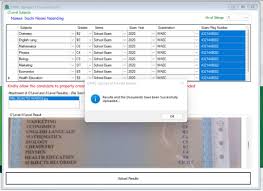
The operator will enter your grades and examination details.
Step 5
The information will be uploaded to the JAMB database.
Step 6
Request confirmation after the upload process is completed.
Many admission experts recommend using accredited CBT centres because they have direct access to the official upload platform.
Can I Upload NECO Result Using My Phone?
Some online resources mention self-service options through JAMB e-Facility. However, many candidates still use accredited CBT centres because they provide direct assistance and reduce the risk of errors.
If you are unsure about the process, visiting a CBT centre remains the safest option.
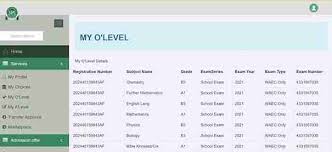
How to Check If Your NECO Result Has Been Uploaded Successfully
After uploading your NECO result to JAMB portal, you should verify that the upload was successful.
Method 1: Check Through CAPS
Log in to your JAMB profile.
Navigate to CAPS.
Check your O’Level information.
If your subjects and grades appear correctly, the upload was successful.
Method 2: Visit a CBT Centre
You can request verification from the centre that performed the upload.
Method 3: Use JAMB Profile Services
Some profile sections may display your uploaded O’Level details.
Always verify your result before admission processing begins.
How Long Does It Take for NECO Result Upload to Reflect?
The upload may reflect immediately in some cases.
In other situations, it may take several hours or a few days before appearing on your profile.
If the result does not appear after a reasonable period, contact the CBT centre where the upload was performed.
Common Mistakes Candidates Make
Waiting Too Long
Delaying the upload process can affect admission consideration.
Using Incorrect Examination Number
A wrong NECO examination number can lead to verification failure.
Uploading Wrong Grades
Always double-check every subject and grade entered.
Ignoring Verification
Never assume the upload was successful without checking.
Name Mismatch
Differences between your NECO and JAMB records can create complications.
Can I Upload NECO and WAEC Together?
Yes.
JAMB allows result combination where permitted by the institution and course requirements.
Many candidates combine WAEC and NECO results to meet admission requirements.
However, ensure that:
- Subjects are complete
- Grades are accurate
- Institution accepts combined results
Always check your school’s admission policy.
What Happens If I Do Not Upload My NECO Result?
Failure to upload your NECO result to JAMB portal can have serious consequences.
These may include:
- Admission delay
- Screening disqualification
- Inability to receive admission offer
- CAPS processing issues
Several admission guides emphasize that candidates without uploaded O’Level results may not be considered for admission even when they meet other requirements.
Can Direct Entry Candidates Upload NECO Result?
Yes.
Direct Entry candidates must also upload their O’Level results.
Even though Direct Entry applicants possess additional qualifications such as:
- ND
- NCE
- HND
- IJMB
- JUPEB
They still need valid O’Level credentials for admission processing.
What If I Uploaded the Wrong NECO Result?
Mistakes happen.
If you discover that the wrong result was uploaded:
- Visit an accredited CBT centre immediately.
- Explain the issue.
- Request correction.
- Provide the correct NECO details.
The earlier you correct the error, the better.
Can I Upload NECO Result More Than Once?
Yes.
Candidates sometimes update records when corrections become necessary.
However, avoid unnecessary changes.
Ensure that every update is accurate.
How Much Does It Cost to Upload NECO Result to JAMB Portal?
Fees may vary depending on the CBT centre and location.
Since charges can change, candidates should confirm the current fee at an accredited JAMB CBT centre before proceeding.
What Is the Difference Between Entering Grades During Registration and Uploading Results?
This is where many candidates become confused.
During Registration
You simply indicate your O’Level grades or select awaiting result.
After Registration
You must ensure the actual result is uploaded and visible on the JAMB system.
These are two different processes.
Completing registration does not automatically mean your result has been uploaded.
Signs Your NECO Result Upload Was Successful
You can consider the upload successful when:
- Your grades appear on CAPS.
- Subject combinations are visible.
- Institution screening reflects your O’Level details.
- There are no verification issues.
Always confirm before admission processing begins.
Frequently Asked Questions
Can I Upload My NECO Result After Post UTME?
Yes. However, it is advisable to upload it earlier to avoid admission delays.
Can I Upload NECO Result Without Visiting a CBT Centre?
Some online methods may exist, but accredited CBT centres remain the most reliable option for many candidates.
Does JAMB Accept Awaiting NECO Result?
Yes. Candidates can register with awaiting result and upload the NECO result once released.
Can I Use Only NECO for Admission?
Yes. NECO is fully accepted provided it meets course requirements.
Can I Combine NECO and WAEC?
Yes, if the institution permits combined results.
Will I Get Admission Without Uploading My NECO Result?
Your admission chances may be severely affected because institutions and JAMB need access to your verified O’Level record.
Final Thoughts
If you are asking, “Can I upload my NECO result to JAMB portal?” the answer is an absolute yes.
Both UTME and Direct Entry candidates are expected to upload their NECO result to JAMB portal as part of the admission process. The upload helps JAMB and tertiary institutions verify your qualifications and determine your eligibility for admission. Candidates who fail to upload their NECO result to JAMB portal risk admission delays and possible disqualification from admission consideration.
To stay on the safe side, upload your NECO result to JAMB portal immediately after the result becomes available, verify that it reflects correctly on your profile, and keep monitoring your CAPS status throughout the admission process.