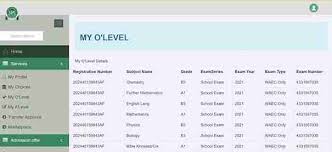
Uploading O’Level Results on JAMB CAPS Portal
Many students ask the same question every admission season: how do you upload O’level results on JAMB CAPS? If you have finished your WAEC, NECO, NABTEB, or GCE exams and you want to stand a good chance for admission, you must upload those results correctly. Without this step, JAMB will not consider you for admission even if you scored high in UTME.
Uploading your O’level results on JAMB CAPS is a simple but very important process. It allows the Central Admissions Processing System (CAPS) to see your full qualifications.
Schools use this information to decide who gets offered admission. In this detailed guide, I will walk you through everything step by step so you can do it right the first time.
Whether you are trying to upload from your phone, computer, or through a CBT centre, this article covers all the methods, common mistakes, and tips to make sure your upload succeeds. Let’s get started.
Why You Must Upload Your O’Level Results on JAMB CAPS
JAMB created CAPS to make admission fair and transparent. Before CAPS, institutions handled everything manually, which caused delays and complaints. Now, everything happens through one system.
Your O’level results (WAEC, NECO, NABTEB, or equivalents) prove you have the basic qualifications for your chosen course. Most university courses need at least five credits, including English Language and Mathematics. Some competitive courses like Medicine, Law, or Engineering ask for higher grades or specific subjects.
If your results show as “Awaiting Result” in CAPS, institutions cannot offer you admission. That is why JAMB always reminds candidates to upload their results as soon as they are available. Many students lose their admission slots simply because they forgot or delayed this step.
Uploading early also helps you avoid last-minute rush when thousands of other candidates are trying to access the portal at the same time. It gives you peace of mind and lets you focus on other parts of the admission process, like checking your status regularly and accepting offers when they come.
When Can You Upload O’Level Results on JAMB CAPS?
You can upload your O’level results in two main periods:
- During JAMB UTME or Direct Entry registration – If you already have your results, you upload them right away at the CBT centre.
- After registration and after results are released – This applies to candidates who wrote “awaiting result” during registration.
JAMB sometimes re-opens the upload portal at different times during the admission cycle. For candidates who sat for recent WAEC or NECO exams, you should wait until your results are officially out before uploading. Trying to upload too early may not work.
Once the results are released, act fast. Many schools start releasing admission lists soon after, and your results need to be in the system for CAPS to match you properly.
Direct Entry candidates also need to upload both O’level and A’level results where required. The process is similar, but you may need to provide extra details about your higher qualifications like ND, NCE, IJMB, or JUPEB.
Requirements Before You Upload O’Level Results
Before you start the upload process, gather these items:
- Your JAMB registration number or the email address you used to create your JAMB profile.
- Your JAMB password.
- A printed or clear copy of your O’level result (WAEC, NECO, NABTEB, or GCE).
- Scratch card or result checker token for WAEC/NECO if needed for verification.
- Access to a good internet connection (for online attempt).
- Your phone or a computer (preferably a laptop for better view).
If you are going to a CBT centre, take your original result slip or statement of result, a valid ID, and your JAMB profile details. Some centres now require biometrics for security, so be ready for that.
Make sure your result is not up to two sittings unless your chosen course allows it. Most institutions accept a maximum of two sittings, but some like Medicine accept only one sitting.
Double-check that the names on your O’level result match exactly with the names on your JAMB form. Any mismatch can cause problems later.
Step-by-Step Guide: How to Upload O’Level Results on JAMB CAPS Online
Many candidates prefer to try the online method first because it saves time and transport money. Here is exactly how to do it:
- Open your web browser and go to the official JAMB e-facility portal at https://efacility.jamb.gov.ng/.
- Log in using your JAMB registration number or the email address linked to your profile and your correct password. If you forgot your password, use the “Forgot Password” option to reset it.
- Once logged in, look for the menu and click on “Check Admission Status”.
- On the next page, click the button that says “Access My CAPS”.
- Inside your CAPS dashboard, find and click on “My O’Level Result” or “Upload O’Level Result” (the exact wording may vary slightly depending on updates).
- Select the examination type – for example, WAEC, NECO, NABTEB, or GCE.
- Enter the examination year, your exam number, and any other required details like the scratch card PIN if prompted.
- Carefully type in all your subjects and the exact grades you obtained. Be very accurate here. English Language and Mathematics are usually compulsory.
- Review everything twice. Make sure there are no typing errors in subjects or grades.
- Click “Submit” or “Upload” to send your results to the system.
- Wait for confirmation. The system may show a success message or ask you to refresh the page.
After submission, go back to “My O’Level Result” to verify that your grades now appear correctly instead of “Awaiting Result”.
If the portal feels slow or you get an error, try again later or switch to a different browser. Some people find that using a laptop in desktop mode works better than mobile phones.
How to Upload O’Level Results at a JAMB Accredited CBT Centre
If the online method does not work or you feel more comfortable with help, visit any JAMB-approved CBT centre. This is the most reliable way because the officials there have direct access and can handle verification properly.
Here is what to do:
- Locate a nearby accredited CBT centre. You can check the official JAMB website or ask other students for recommendations. Avoid random cyber cafes.
- Go there with your printed O’level result, JAMB registration slip, and any other required document.
- Tell the official that you want to upload your O’level results on JAMB CAPS.
- Provide your JAMB registration number and profile details.
- They will log into the system using your credentials or their admin access.
- You or the official will enter the subjects and grades carefully.
- In many cases, they will ask for your biometrics (fingerprint) for security.
- Once done, they will submit and give you a confirmation slip or show you that the results now appear in your CAPS.
Pay only the official fee if any. Some centres charge a small service fee, but be careful of overcharging. Always ask for a receipt.
This method is especially useful for candidates who have issues with internet, wrong passwords, or complicated result combinations (like two sittings from different boards).
How to Check If Your O’Level Results Have Been Uploaded Successfully
After uploading, do not assume it is done. You must confirm.
Follow these steps to check:
- Log in to https://efacility.jamb.gov.ng/ again.
- Click “Check Admission Status”.
- Click “Access My CAPS”.
- Go to “My O’Level Result”.
- If you see your subjects and grades listed clearly, the upload was successful.
- If it still shows “Awaiting Result” or the section is blank, the upload did not go through. Try refreshing the page or repeat the process.
Sometimes it takes a few hours or even a day for the system to reflect the changes. So check again after some time. If it still does not show, go back to the CBT centre for assistance.
Common Mistakes Students Make When Uploading O’Level Results and How to Avoid Them
Even simple mistakes can delay your admission. Here are the most common ones I see every year:
- Typing wrong grades or mixing up subjects – Always cross-check with your original result slip before submitting.
- Using wrong examination year or seat number – Make sure these details match exactly.
- Uploading before results are officially released – Wait for WAEC or NECO to release results first.
- Mismatch in candidate names – JAMB is strict about name consistency across all documents.
- Trying to upload with poor internet connection – This often leads to incomplete submission.
- Forgetting to refresh CAPS after upload – The system needs refresh to display new data.
- Using unaccredited centres – They may enter wrong information or charge extra without success.
Take your time. Rushing through the form is one of the fastest ways to make errors that are hard to correct later.
If you notice a mistake after submission, visit a CBT centre immediately and request a correction or re-upload. Explain the issue clearly so they can help you fix it.
What to Do If You Encounter Errors During Upload
Errors are common, especially when many people are using the portal at once. Here are solutions for frequent problems:
- “Invalid login details” – Double-check your password or reset it. Make sure caps lock is off.
- “Unable to access CAPS” – Try a different browser or clear your cache. Some people use desktop mode on their phone.
- “Result already uploaded” – This means it is already in the system. Just verify it shows correctly.
- “Biometrics required” – You have to go to a CBT centre for fingerprint verification.
- Portal slow or not responding – Come back in the evening or early morning when traffic is lower.
- “Awaiting Result” still showing after upload – Wait 24 hours and refresh. If still there, re-upload at a centre.
If nothing works, contact JAMB support through their official channels or visit a JAMB state office. Keep records of every attempt you make, including dates and screenshots if possible.
Tips for Successful O’Level Upload on JAMB CAPS
- Use a strong and stable internet connection. Mobile data sometimes works better than Wi-Fi in some areas.
- Prepare all details on paper first before entering them online.
- Upload as soon as your results are out. Do not wait until admission lists start coming out.
- For two sittings, make sure both results are from boards that JAMB accepts and that your course allows combined results.
- Keep your JAMB email active because important notifications may come there.
- Take a screenshot or print confirmation after successful upload.
- Share this guide with friends who are also applying so everyone gets it right.
Remember that some 2025 WAEC or NECO candidates may need to wait a bit longer if JAMB has specific windows for recent results. Always check official announcements.
How O’Level Results Affect Your Admission Chances in CAPS
CAPS works like a marketplace where institutions can see qualified candidates. Your JAMB score, O’level grades, and other factors determine your eligibility.
Having strong credits in relevant subjects can push you higher in the ranking for competitive courses. For example, a student with mostly A’s and B’s in science subjects has a better chance for Medicine than someone with C’s.
Institutions set their own cut-off marks and subject requirements. Make sure your uploaded results meet or exceed what your first-choice school asks for.
Even if you meet the general JAMB minimum, your specific O’level combination must align with the course. That is why it is wise to check departmental requirements on the school’s website before choosing courses.
Differences Between Uploading O’Level and A’Level Results
Direct Entry candidates often need to upload both O’level and A’level (or equivalent) results.
The process for A’level is similar, but you will see extra fields for your higher qualification details like institution attended, year of completion, and certificate type (IJMB, JUPEB, ND, NCE, etc.).
Make sure you upload O’level first because some A’level uploads require the base O’level to be present.
If you are a Direct Entry applicant, double-check with your chosen institution whether they need any additional uploads or verifications.
What Happens After You Successfully Upload Your O’Level Results
Once your results are in the system and showing correctly, you can:
- Check your admission status regularly on CAPS.
- Receive possible admission offers from institutions.
- Accept or reject offers within the given time.
- Print your admission letter when offered.
JAMB will notify you through the portal or email if there are any issues. Keep logging in from time to time, especially during peak admission periods.
Some students get admission in the first list, while others come in supplementary lists. Staying patient and keeping your details updated is key.
Frequently Asked Questions About Uploading O’Level Results on JAMB CAPS
Can I upload my O’level results from my phone? Yes, you can try, but a computer gives a better experience because the CAPS interface is designed for desktop view. If using your phone, switch to desktop site mode in your browser settings.
Is there any fee to upload O’level results? JAMB does not charge for the upload itself. However, CBT centres may ask for a small service fee. Be wary of anyone asking for large amounts.
What if I have two sittings? You can upload both. Enter the details for each sitting carefully. Confirm that your course accepts combined results.
My result is not showing after upload. What should I do? Refresh the page several times. Wait for some hours and check again. If still not visible, return to the CBT centre for re-upload.
Can I change my O’level results after uploading? Corrections are possible but not easy. Visit an accredited centre and explain the mistake with proof. It is always better to get it right the first time.
Do I need to upload if I already did it during registration? Usually no. But if your results were “awaiting” and are now available, you should update them.
Is uploading compulsory for admission? Yes. Without uploaded and verified O’level results, you will not be considered for admission through CAPS.
Final Advice for All JAMB Candidates
Uploading your O’level results on JAMB CAPS is one of those small steps that can make a big difference in your admission journey. Treat it seriously and do it correctly.
Stay informed by visiting the official JAMB website regularly and following trusted education pages for updates. Avoid relying on rumours or unverified sources that might mislead you.
If you follow the steps in this guide carefully, you should have no problem getting your results into the system. Once that is done, focus on checking your CAPS frequently and preparing for the next stages like accepting admission offers.
Admission is a process, not a one-time event. The earlier you handle your O’level upload, the smoother the rest of your journey will be.
Good luck with your admission. Put in the effort now, and you will thank yourself later when you see your name on the admission list.
This guide has covered the complete process in simple, clear steps so that every candidate, whether in Lagos or any other part of Nigeria, can follow along easily. Take action today and secure your spot in the admission race.