How to Check Your NECO Result With Your Registration Number: Complete Step-by-Step Guide
If you are wondering how to check your NECO result with your registration number, you are not alone. Thousands of candidates search for information about how to check your NECO result with your registration number immediately after the National Examinations Council releases examination results.
The good news is that checking your NECO result is simple when you know the correct process. While your registration number is an important requirement, you will also need a valid NECO result checking token to access your result online through the official portal.
This detailed guide explains how to check your NECO result with your registration number, the requirements you need, common errors you may encounter, and how to solve them quickly.
Understanding NECO Results
The National Examinations Council (NECO) conducts several examinations for students in Nigeria. After examinations are completed and marked, results are uploaded to the official NECO result-checking portal where candidates can access their grades online.
Many candidates believe they can check their result using only their registration number. However, the official process requires both the registration number and a result-checking token.
Before learning how to check your NECO result with your registration number, it is important to understand the information you will need.
What You Need to Check Your NECO Result
Before checking your result, make sure you have the following:
1. NECO Registration Number
Your registration number is one of the most important details required for checking your result. This number was assigned to you during registration for the examination.
2. NECO Result Checker Token
A result-checking token is required before you can access your result online. Without the token, the portal will not display your result.
3. Examination Year
You must select the correct examination year when checking your result.
4. Examination Type
Choose the correct examination type, such as:
- SSCE Internal
- SSCE External
- BECE
- NCEE
The examination type depends on the exam you sat for.
5. Internet Connection
A stable internet connection helps ensure the result page loads properly.
6. Smartphone, Tablet, or Computer
You can use any internet-enabled device to check your result.
How to Check Your NECO Result With Your Registration Number
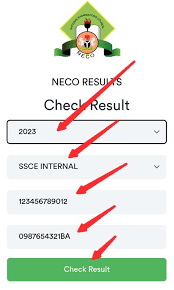
Now let’s go through the exact steps for how to check your NECO result with your registration number.
Step 1: Visit the Official NECO Result Portal
Go to the official NECO result portal:
This is the official platform approved by NECO for checking examination results.
Step 2: Select Your Examination Year
Once you are on the portal, choose the year in which you sat for the examination.
Step 3: Select Examination Type
Choose the examination category that applies to you.
Examples include:
- SSCE Internal (June/July)
- SSCE External (November/December)
Step 4: Enter Your Registration Number
This is the most important step.
Type your registration number carefully into the space provided. Ensure there are no mistakes because a single incorrect digit can prevent your result from appearing.
Step 5: Enter Your Result Token
Input the token you purchased from an approved source.
Step 6: Click “Check Result”
After entering all required information, click the “Check Result” button.
Your result should appear on the screen within a few seconds if all information is correct.
Step 7: Print or Save Your Result
Once your result appears:
- Save a digital copy
- Print a hard copy
- Keep a screenshot for future reference
This helps prevent future issues if you need your result urgently.
Can I Check My NECO Result Using Only My Registration Number?
This is one of the most frequently asked questions.
The simple answer is no.
Although your registration number is required, NECO also requires a valid result-checking token before you can access your result online. The registration number alone is not enough.
Many students search online for ways to check results without purchasing a token. However, NECO’s official system requires both pieces of information before granting access to your result.
How to Get a NECO Result Checker Token
If you do not have a token, you can obtain one through approved channels.
Generally, candidates can:
- Purchase online through NECO services
- Buy from accredited vendors
- Obtain from approved payment channels
Always use authorized sources to avoid scams.
How to Check NECO Result Using a Mobile Phone
Many candidates prefer checking results directly on their phones.
The process is exactly the same:
- Open your browser.
- Visit the NECO result portal.
- Select exam year.
- Select exam type.
- Enter registration number.
- Enter token.
- Click “Check Result.”
The portal is mobile-friendly and works on most smartphones.
How to Check NECO Result Through SMS
NECO has also provided SMS-based result checking options in certain situations.
The common format is:
NECOExamNumberPIN*ExamYear
Send the message according to the official instructions provided by NECO. A valid PIN or token is still required for this process.
Before using SMS services, verify the correct shortcode and instructions from official NECO sources.
Common Problems When Checking NECO Results
Many candidates face challenges while trying to access their results.
Below are some common issues and solutions.
Invalid Registration Number
If you receive an invalid registration number message:
- Verify the number carefully.
- Check for typing errors.
- Ensure you selected the correct exam year.
Invalid Token
An invalid token error may occur if:
- The token was entered incorrectly.
- The token has already been exhausted.
- The token is fake or unauthorized.
Portal Not Loading
Sometimes the portal becomes slow due to heavy traffic.
Solutions include:
- Try again later.
- Use a stronger internet connection.
- Clear your browser cache.
- Use a different browser.
Result Not Available
In some cases, your result may not be available immediately.
Possible reasons include:
- Results are still being uploaded.
- Technical issues on the portal.
- Examination processing is not fully completed.
Wait and check again later.
Why Your Registration Number Is Important
Your registration number serves as your unique examination identity.
NECO uses it to:
- Locate your examination record
- Retrieve your grades
- Verify your examination details
- Match your information with the database
Without the correct registration number, it becomes impossible to retrieve the correct result.
Tips for Successful NECO Result Checking
To avoid frustration while checking your result, follow these tips:
Keep Your Registration Number Safe
Store your registration details in multiple places.
Use the Official Portal
Avoid unofficial websites claiming to provide free result access.
Use only the official NECO portal.
Buy Tokens From Approved Sources
Unauthorized vendors may sell invalid tokens.
Always purchase through approved channels.
Double-Check Your Information
Before clicking the result button:
- Confirm examination year.
- Confirm examination type.
- Confirm registration number.
- Confirm token number.
Save Your Result Immediately
After viewing your result:
- Download it.
- Print it.
- Email a copy to yourself.
This helps ensure you always have access.
What to Do If You Lost Your Registration Number
If you cannot find your registration number:
Check Your Examination Slip
Your exam slip usually contains your registration number.
Contact Your School
School candidates can request assistance from their school administration.
Contact NECO Support
Candidates can contact NECO through official support channels for guidance on retrieving examination information.
How Many Times Can a Token Be Used?
Token usage may be subject to specific conditions and limits depending on NECO policies and the type of token purchased. Always review the instructions that come with the token.
Is the NECO Result Portal Safe?
Yes, the official NECO result portal is designed for secure result access.
To stay safe:
- Avoid sharing your token publicly.
- Do not use cybercafes you do not trust.
- Log out after checking your result.
- Keep your credentials private.
Frequently Asked Questions
Can I Check My NECO Result With My Registration Number?
Yes, your registration number is required for checking your result. However, you will also need a valid result-checking token.
Can I Check My NECO Result Without a Token?
No. A token is required before the result can be accessed online.
Can I Use My Phone to Check My Result?
Yes. You can use any smartphone with internet access to check your result.
What Website Should I Use?
Use the official NECO result portal:
What Should I Do If My Result Does Not Appear?
Verify all details entered and try again later. If the problem persists, contact NECO support.
Final Thoughts
Understanding how to check your NECO result with your registration number is essential for every candidate. The process is straightforward when you have the right information. Simply visit the official NECO result portal, select your examination details, enter your registration number, provide a valid result-checking token, and view your result.
Remember that while your registration number is a key requirement, it cannot be used alone. A valid NECO result-checking token is also necessary to access your grades online. By following the steps outlined in this guide, you can successfully check your NECO result with your registration number and avoid common mistakes that prevent candidates from accessing their results.